
Block sensitive content
Keep the AI chat open. Check outgoing prompts, supported draft autosaves and eligible file uploads locally for personal data, secrets and confidential markings.
Keep customer data and credentials out of AI chats. Block sensitive prompts and file uploads while employees keep using approved AI tools.
Keep the AI chat open. Check outgoing prompts, supported draft autosaves and eligible file uploads locally for personal data, secrets and confidential markings.
Allow employees to ask questions while restricting file transfers to a selected destination. Use this when even a clean document should stay inside the business.
Restrict access to a forbidden website or service. Choose destinations individually and use a separate API rule where the catalog lists one.
Use the sensitive-submission rule in managed Chrome or Edge on Windows. Select the AI destinations your organization wants to protect.
This public demo shows a paste to Claude with one API-key finding and two email matches. An investigator can follow the observation back to the reporting endpoint.
Investigate a sensitive paste →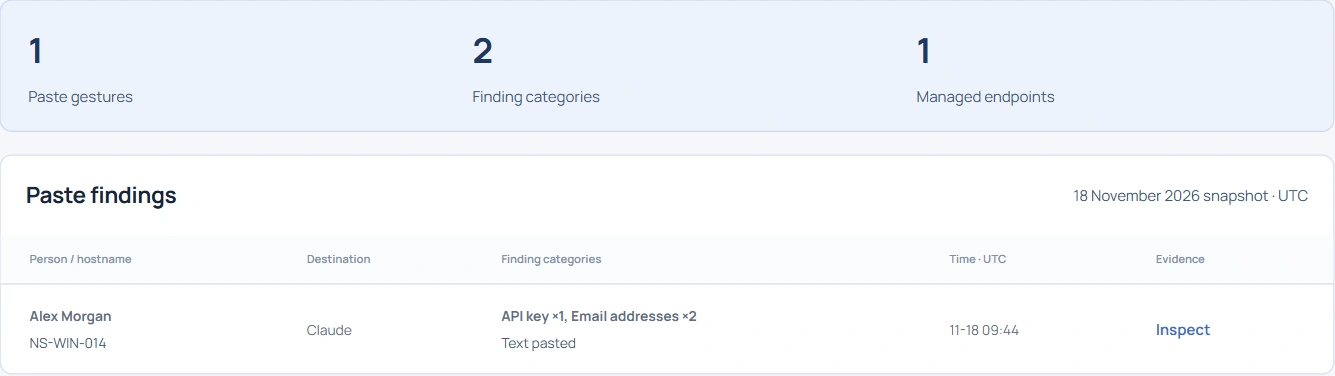
AI data loss prevention (AI DLP) checks what employees send to AI tools and enforces rules before sensitive data reaches the destination. A content rule can allow a harmless question and block a second question containing a customer’s email address, even when both go to the same AI tool.
The sensitive-submission rule covers ChatGPT, Claude, DeepSeek, Gemini, Kimi and Perplexity in managed Chrome and Edge on Windows. IT deploys Upload Guard and assigns the browser policy. Firefox website restrictions, desktop apps and unmanaged browsers have different coverage.
Upload Guard checks supported outgoing text requests for patterns such as API keys, password assignments, private keys, email addresses and confidentiality markings. It can inspect direct text, CSV and Markdown uploads up to 512 KiB. It blocks unsupported transfers, including multipart uploads, PDFs and Office files, even when their contents are harmless.
Upload Guard checks the outgoing request on the Windows endpoint. It does not send the prompt or matched secret to AI Tool Tracking. Separately enabled activity monitoring can report finding categories, counts, destinations and endpoint context for investigation.
Choose a destination, a managed browser and a synthetic file. Walk through what gets blocked with our team.