
Count the devices in scope
Record the expected hostnames, included groups, exclusions and reporting time. Keep missing devices in the total so a small set of healthy laptops cannot hide an incomplete rollout.
Three devices are in the sample Intune report. One has installed the application and checked in. Before adding another group, see which device can also produce the browser activity your security team needs.
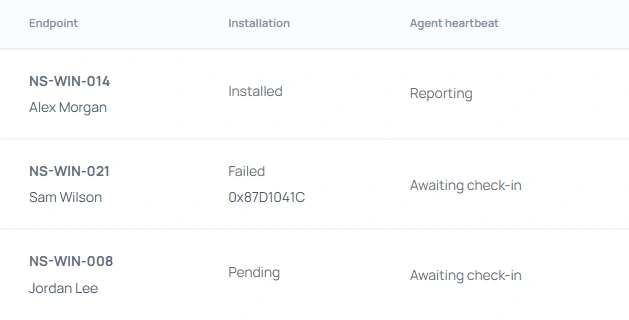
Record the expected hostnames, included groups, exclusions and reporting time. Keep missing devices in the total so a small set of healthy laptops cannot hide an incomplete rollout.
Use a harmless test file on an approved AI page. Find the filename on the same device in your tenant, then record the action and UTC time. Repeat for each browser or action the next group needs.
Record failed installations, missing check-ins and unavailable browser adapters separately. Give the endpoint team a device and a reproducible test. Recheck the affected device before expanding the group.
The troubleshooting guide follows an Engineering laptop with a recent heartbeat and an unavailable adapter. Use the companion scorecard to record what your own pilot demonstrated.