
Did someone select this document?
Search a filename and open the receipt. Read the observed gesture, destination and any related HTTP outcome before deciding whether a transfer can be established.
Investigate a document →Start with an account or hostname. See which assistants and coding tools appeared on a managed Windows device, which files were selected, and where a paste triggered a sensitive-data finding.
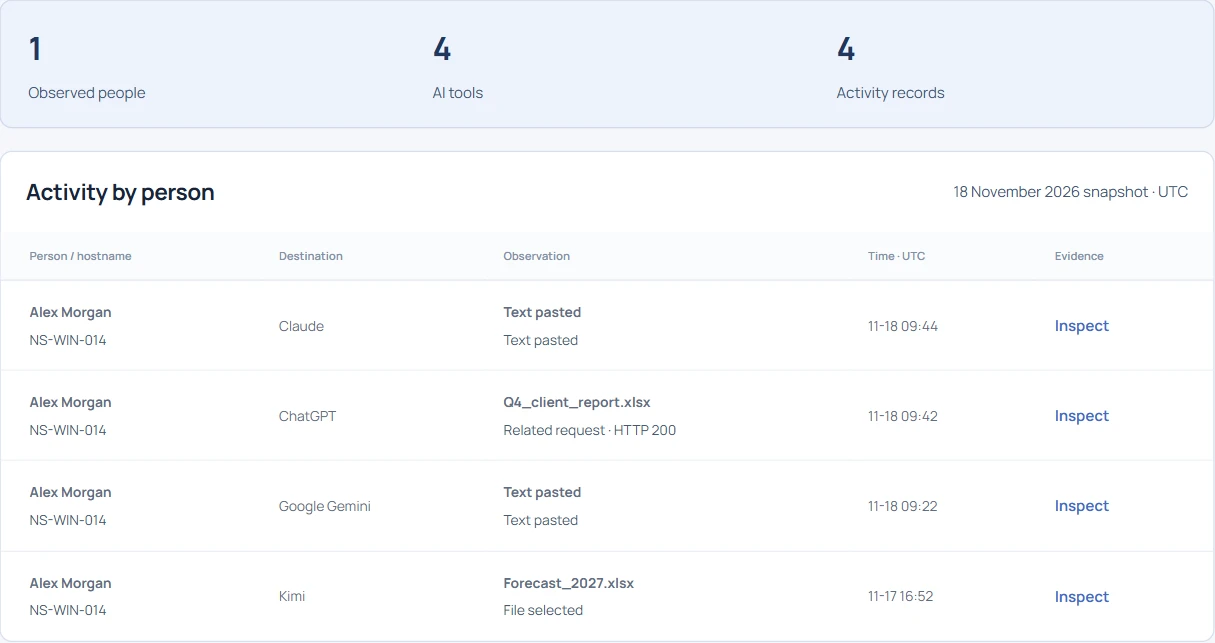
Search a filename and open the receipt. Read the observed gesture, destination and any related HTTP outcome before deciding whether a transfer can be established.
Investigate a document →Look for a category such as an API key pattern or email address. Use the source device and time to route the finding to the right reviewer.
Investigate a sensitive paste →A Cursor process, a Claude paste and a Kimi file selection need three different decisions. Compare the receipts with a dated list of approved tools and workspaces.
Get the worked AI register →A workstation can have a local Finance session and a remote support session open at the same time. Follow one Claude paste from its hostname to a reviewable case note.